Create an appointment to change the backup battery
HP recommends that you change the backup battery after a year's use. A foolproof method of remembering to do this is to set a "change backup battery" appointment in Appointment Book. Schedule the appointment for one year from your last battery change.
Be aware, however, that in some situations a yearly change may not be enough. If the palmtop's main batteries run completely down, the unit will start drawing power from the backup battery. This will drain the battery quickly, and it may last only a few days.
Before replacing the backup battery, make sure the main batteries are charged. If the backup battery is removed when the main batteries are dead, you'll lose everything on the C: drive and everything in memory.
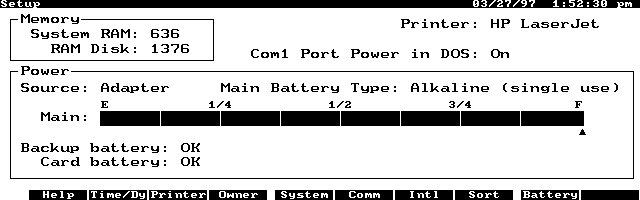
To check the condition of your batteries, run the Setup application, by pressing (CTRL)+(FILER). The opening screen will tell you the charge status of the main batteries, the backup battery, and the card battery (if a card is installed). (See Screen 4.)
The opening screen in Setup shows the condition of batteries, and whether the AC adapter is connected and working.
If you've got your palmtop plugged into an AC adapter, make sure that the screen displays the words, "Power Source: Adapter." These words indicate that the adapter is, in fact, powering your palmtop. If the screen says, "Power Source: Battery," there's something wrong with the adapter, its cord, or the connector.